Business Central 2026 release wave 2 (BC29) introduces an important improvement for AL developers and extension developers: table extension keys can now span fields from the base table and the table extension.
This is a relatively small developer-focused change, but it can have a significant impact on database indexing, query performance, SIFT, and custom data modelling in Business Central.
In this article, let’s understand what has changed, why it matters, and how you can use it in AL development.
What is the new feature in BC29?
In previous versions of Business Central, developers could define keys in a tableextension, but there was an important limitation.
A key could contain:
- Fields from the base table, or
- Fields added by the table extension
But a single key could not combine fields from both.
With Business Central 2026 Wave 2 (BC29), this limitation is removed.
Microsoft’s new table extension data model allows developers to define indexes that span fields from the base table and its table extensions.
In simple terms:
BC29 allows mixed-field indexes containing both standard/base fields and extension fields.
This gives AL developers considerably more flexibility when designing indexes for custom solutions.
How did it work before BC29?
Let’s take the standard Customer table as an example.
Suppose we add three custom fields through a table extension:
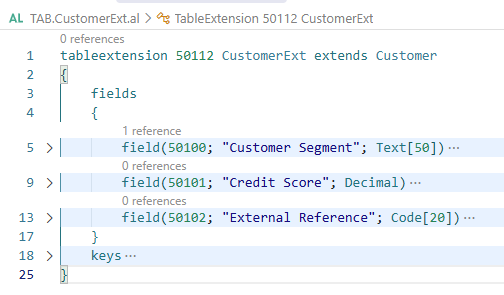
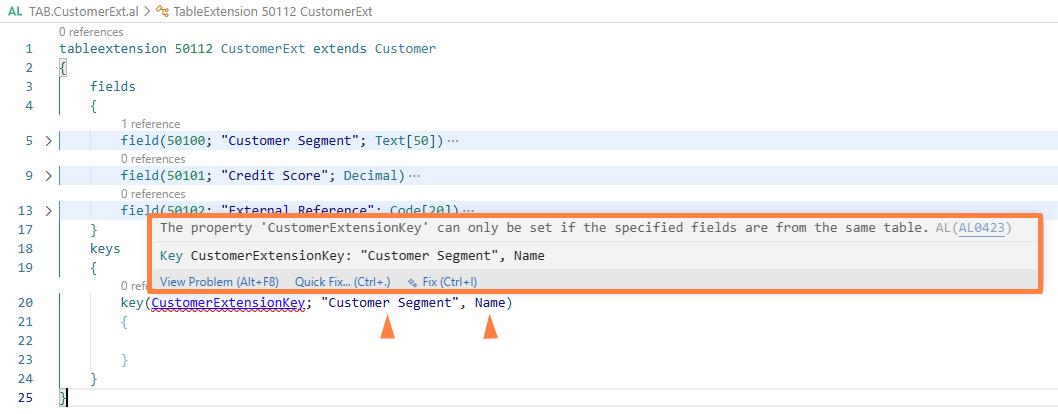
The reason was that "Customer Segment" belongs to the table extension while "No." and Name belong to the base Customer table.
Microsoft’s documentation historically described this restriction: a key in a table extension could contain base-table fields or extension fields, but a single key couldn’t mix the two.
What changes in BC29?
With BC29, the mixed-field key is now possible.
The same example can now be defined as:
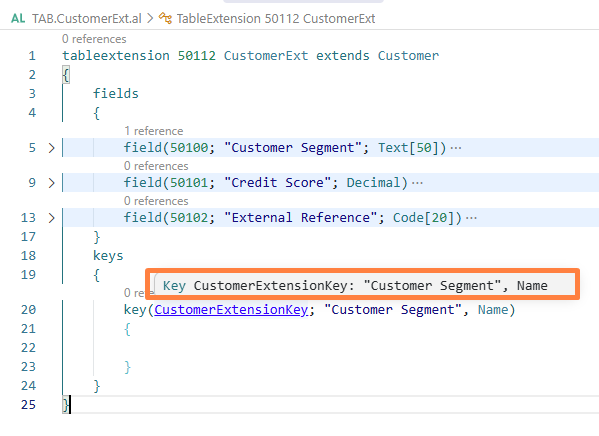
Here, the key contains fields from both sources:
| Field | Source |
| Customer Segment | Table Extension |
| Credit Score | Table Extension |
| Name | Base Customer Table |
This is the major change introduced with BC29.
Why is this important?
At first glance, this may look like a small syntax improvement.
However, indexes are an important part of database performance.
Business Central uses keys to define how data can be indexed and accessed. Secondary keys are implemented as SQL Server indexes and can significantly improve data retrieval when they match the application’s filtering, sorting, and query patterns.
Consider a custom requirement where users frequently search customers based on:
- Customer Segment
- Customer No.
- Customer Name
- Credit Score
If some of these fields are standard fields and others are custom extension fields, BC29 allows developers to create one index that represents this actual access pattern.
This can result in cleaner database design and potentially better query performance.
BC23 laid the foundation
This BC29 improvement is closely related to an earlier change introduced in Business Central 2023 release wave 2 (BC23).
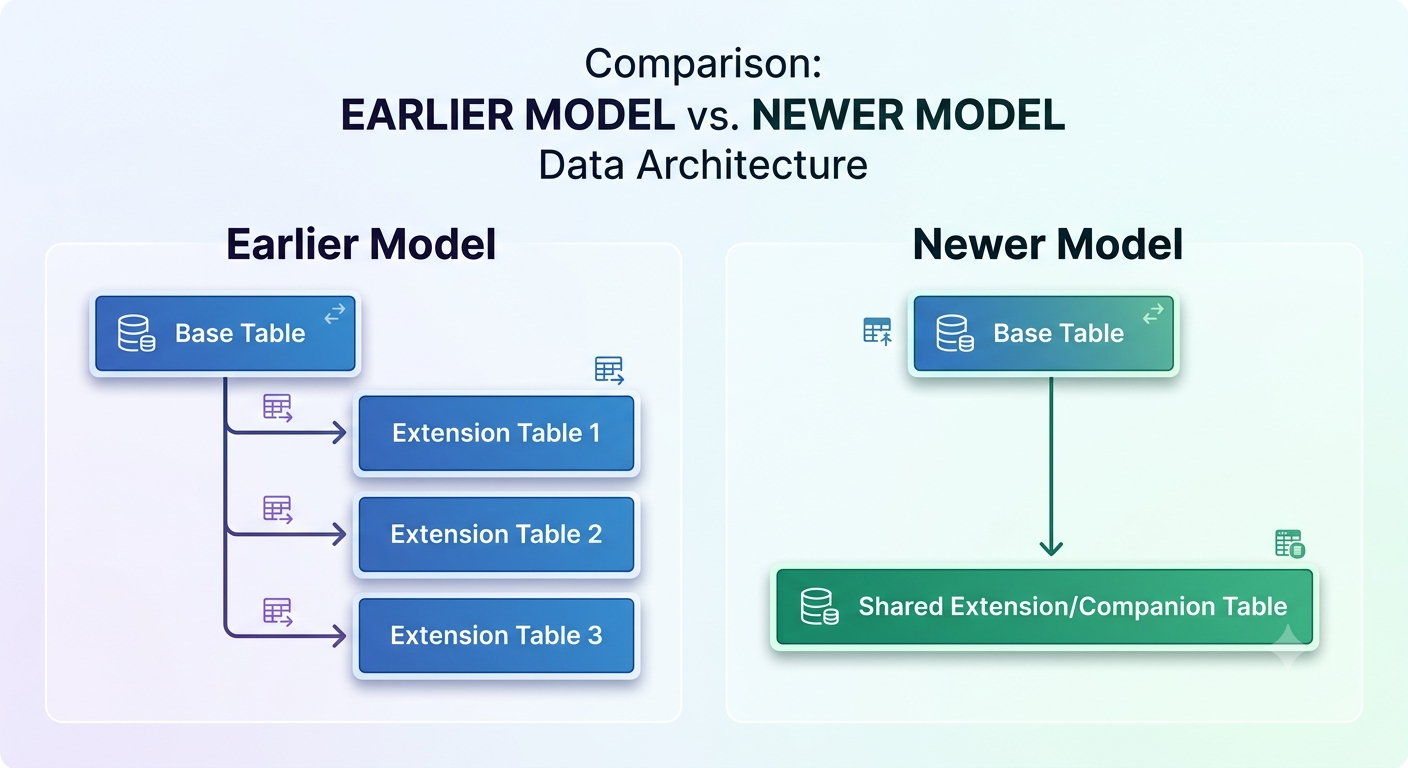
Before BC23, fields added through table extensions were stored using separate companion tables. When multiple extensions existed, Business Central could potentially need multiple joins to retrieve data.
BC23 introduced a new data model where fields from table extensions are stored in a shared companion table. This significantly reduced the number of joins required when accessing extension fields.
The simplified architecture can be represented conceptually as:
BC29 builds further on this evolution by allowing indexes to span the base table and extension fields.
So, from a database architecture perspective, BC29 is an important continuation of Microsoft’s work to make table extensions more efficient and flexible.
What should developers consider?
Although the new capability is powerful, developers should still follow good indexing practices.
Don’t create indexes for every field –More indexes don’t necessarily mean better performance.
Consider field order – The order of fields in an index matters. Put the fields that best support the expected filtering and sorting pattern in the appropriate order.
Analyse real workloads – Don’t create an index simply because a field exists.
Look at:
-
Query patterns
-
Page filters
-
Reports
-
API requests
-
Background processes
-
Performance telemetry
Test in realistic data volumes – An index that looks useful with 1,000 records may behave differently with millions of records.
Review existing indexes – Before adding a new key, check whether an existing index already supports the required access pattern.
BC29: A small change with a big developer impact
The ability to create indexes across base table fields and table extension fields may not be one of the most visible BC29 features for end users, but it is an important improvement for Business Central developers.
The evolution is interesting:
BC18
Developers gained the ability to create keys in table extensions using fields from the base table.
BC23
Microsoft introduced a new data model for table extensions, reducing the performance impact of multiple extensions.
BC29
Developers can now create mixed-field indexes combining base-table and extension fields.
This progression gives extension developers much greater control over database design while keeping the AL programming model familiar.
For developers building complex Business Central extensions, especially AppSource solutions and large customizations, this can make database indexing cleaner, more flexible, and better aligned with real-world query patterns.
Final thoughts
Business Central 2026 Wave 2 continues to introduce improvements that may not always be visible from the user interface but are highly relevant to developers.
The BC29 mixed-field index capability is a good example.
If your extension adds fields to standard Business Central tables and those fields are frequently queried together with standard fields, this new capability is worth investigating.
BC29 effectively removes an important limitation in table extension indexing and gives AL developers more freedom to design indexes around real business requirements.
If you’re developing or upgrading a Business Central extension for BC29, this is one of the database-related changes worth adding to your technical checklist.
One thought on “Business Central 2026 Wave 2 (BC29): Create Indexes Across Base Table and Table Extension Fields”