Microsoft Dynamics 365 Business Central continues to improve the web client experience with features that make everyday tasks faster and more user-friendly.
One useful improvement is the ability to preview image attachments directly in the Business Central web client without downloading them first.
Previously, users often had to download an image attachment to their local device before opening it. With this new experience, images can be opened directly in a preview window, providing an experience similar to Print Preview and PDF Preview in Business Central.
This makes working with image attachments more convenient, especially when users work with documents, product images, email attachments, or images generated by extensions.
What is the New Image Preview Experience in Business Central?
The new functionality allows users to open supported image files directly from the Business Central web client.
Instead of downloading an image and opening it separately, Business Central displays the image in a dedicated viewer.
Users can:
- Open an image directly from Business Central.
- View the image in preview mode.
- Use the viewer without downloading the file.
- Download a copy of the image when required.
The overall experience is similar to the existing PDF preview and Print Preview experiences.
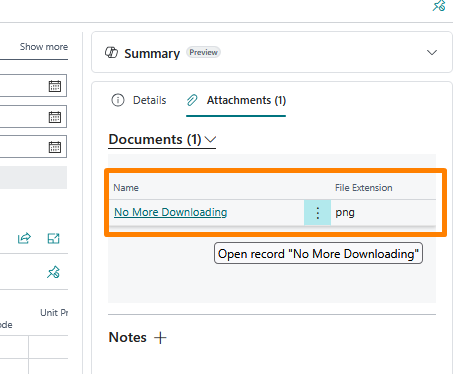
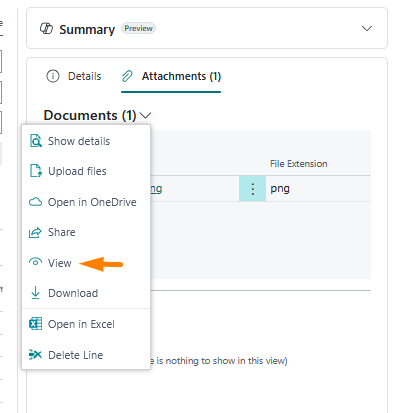
Example
Imagine that a user receives an email containing a product image or an invoice-related attachment.
Previously:
Attachment → Download → Open image
With the new experience:
Attachment → Preview image directly in Business Central
If the user needs a local copy, they can still download the image from the viewer.
Supported Image File Types
The Business Central image preview experience supports several commonly used image formats.
The supported formats include:
| Image Format | Supported |
|---|---|
| JPEG | ✅ |
| JPG | ✅ |
| PNG | ✅ |
| BMP | ✅ |
| SVG | ✅ |
| WEBP | ✅ |
| ICO | ✅ |
| GIF | ✅ |
| AVIF | ✅ |
Both GIF and AVIF support animated versions.
There is also additional browser-specific support:
On the Safari browser, TIFF and TIF image formats are also supported.
This provides good coverage for the image formats commonly used in business applications.

Works Across Business Central
Image preview is available across different areas of Business Central, including:
- Agents
- Attachments
- Extensions
- FactBoxes
This is particularly useful when users need to quickly review supporting images without leaving Business Central.
Support for Business Central Extensions
Extension developers also need to consider this feature when working with images.
For Business Central online, developers should use:
File.ViewFromStream
For Business Central on-premises, use:
File.View
These methods follow a similar pattern to the File.Download method.
If your extension currently downloads an image only so that users can view it, consider using the appropriate view method to provide a better user experience.
GIF Thumbnails in FactBoxes
Another useful improvement is support for GIF files as FactBox thumbnails, including animation for GIFs with up to 48 frames.
Image thumbnails are also clickable, allowing users to open the image in the previewer. The first page of PDF thumbnails can similarly be clicked to open the PDF preview.
Final Thoughts
Direct image preview is a small but useful usability improvement in Microsoft Dynamics 365 Business Central. It reduces unnecessary downloads and allows users to quickly review images directly within the web client.
For developers, using File.ViewFromStream or File.View can help custom extensions provide a more modern and consistent Business Central experience.